
Learn what audit trails are, how document event logs work, and why they’re essential for compliance, security, and process improvement—plus practical steps to set up reliable audit logging in your organization.

When something goes wrong with a document—an incorrect number in a financial report, a policy sent out before it was approved, or a client record accessed by the wrong person—the first question is almost always the same: “Who touched this, and when?”
An effective audit trail gives you a factual, time-stamped answer instead of guesswork. It turns everyday activity into a trackable record you can use for compliance, security investigations, and continuous improvement.
An audit trail is a chronological record of every significant action taken on a document or data record. Each entry typically captures the event type (viewed, edited, deleted, approved, or exported), the user identity, and a precise timestamp, sometimes with additional context such as location, device, or workflow step.
Audit trails go beyond basic version history. While version history focuses on how content changes over time, an audit trail also records access, routing, administrative actions, and other events that never appear in the document body but matter for accountability.
In a document management system (DMS), audit trails are usually generated automatically whenever users interact with files. Every time you open a contract, update a clause, route it to a manager, receive an approval, or finalize the file, each step is logged as a discrete event in the system’s event history.
Over time, this creates a complete narrative for each document: when it was added, who viewed it, which versions were created, what metadata was changed, when permissions were updated, and whether it was printed, emailed, exported, or deleted.
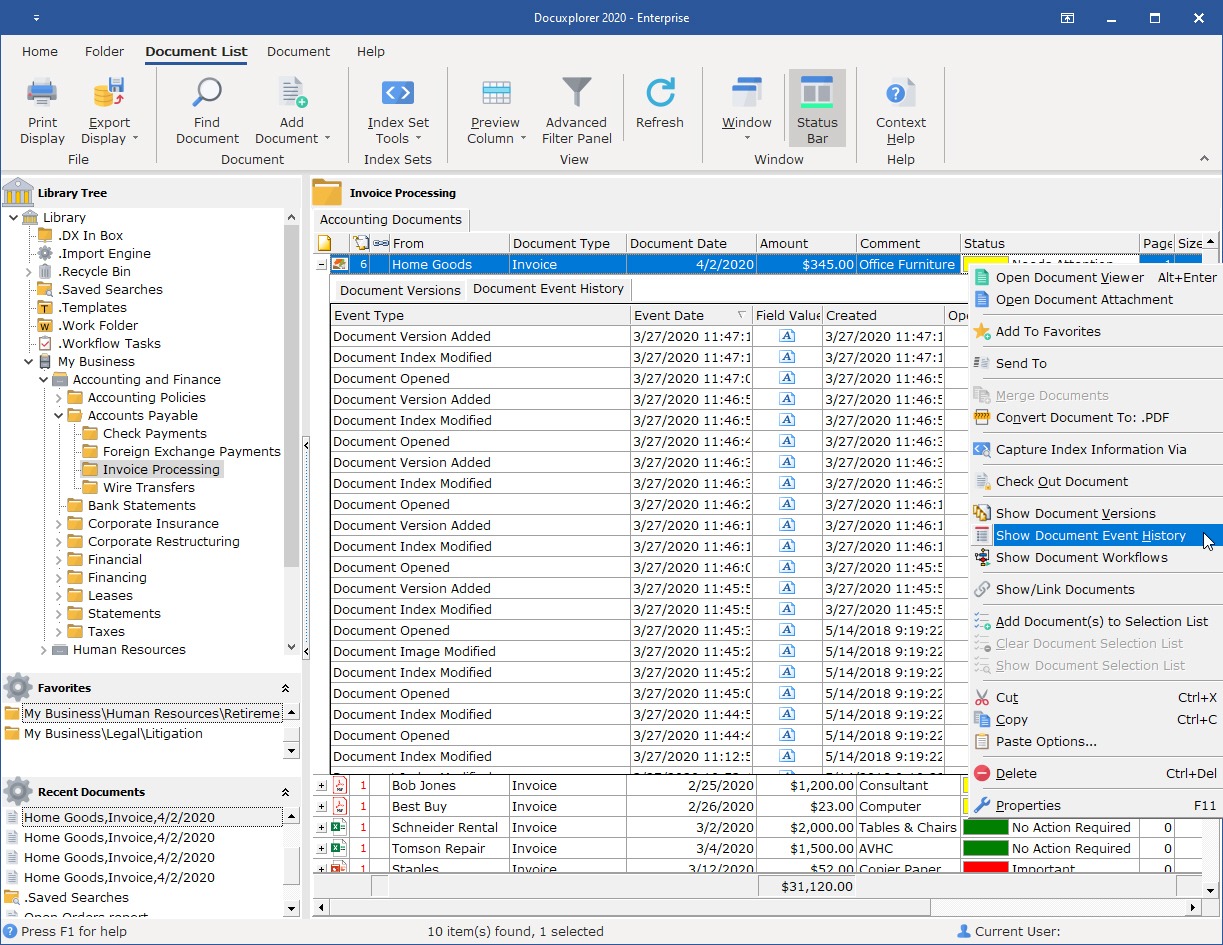
Systems like DocuXplorer maintain this kind of audit trail on every document through a dedicated document event log or history, recording each action with its date, time, and operator so nothing is a mystery. The log can be filtered, viewed, printed, or exported, making it easy for your administrators and auditors to analyze document activity for security and compliance requirements.
An audit trail gives you a clear line of sight into who did what to each document, and when. When a question arises—“Who saw this before it went out?”, “When was this policy updated?”, “Who changed this number?”—you can answer it by querying the event log rather than relying on memory or email threads.
That transparency reduces blame‑shifting and speeds up issue resolution because you can quickly reconstruct the sequence of events and focus on fixing the problem.
Over time, that record becomes a shared source of truth that protects both the organization and individual employees by providing objective context. It also gives leaders and auditors confidence that documented processes such as approvals, reviews, and retentions are actually happening as designed.
When you can point to concrete evidence of who approved a contract or when a retention rule was applied, discussions about responsibility and risk are grounded in real-world use cases.
For organizations in regulated industries such as healthcare, financial services, legal, and government, audit trails are not just helpful; they’re usually required. Frameworks and regulations like HIPAA, SEC and FINRA rules, ISO standards, GDPR, SOX, and others rely on proof that you control access to sensitive data and can show what happened to key records over time.
A complete audit trail makes it much easier to demonstrate due diligence and audit readiness. Rather than manually compiling evidence from multiple systems, you can generate reports that show access, changes, approvals, and retention actions as needed.
Compliance‑focused document management is designed with these requirements in mind, keeping audit trails alongside controls for document security, confidentiality, and lifecycle retention management. By centralizing records and their activity history in one secure repository, teams can retrieve what auditors need quickly without hunting through disparate tools.
Even with carefully designed roles and groups, people sometimes access documents at unusual times, from unexpected locations, or in ways that policy did not anticipate. By analyzing event logs, you can record actual behavior and detect suspicious patterns.
When an incident occurs, event logs become the backbone of your investigation. You can trace exactly which documents were involved, which users interacted with them, and what sequence of actions led to the issue. This lets you tighten policies based on real activity rather than hypothetical risk. For example, if you see recurring cases where drafts are exported unnecessarily, you might adjust export permissions or require user descriptions when printing or emailing. Logged approvals, rejections, and handoffs make workflows more accountable because every decision is traceable.
After a client suspected an employee of self-issuing fraudulent refunds, they used DocuXplorer to investigate. DocuXplorer provided definitive proof by verifying the unique user session and confirming that no one else had accessed those records. This case highlights a major advantage of DMS-enabled audit trails: they offer a level of forensic accountability that traditional accounting methods lack.
Are audit trails good for anything beyond compliance and security? Yes—audit trails also help reduce errors and rework. When incorrect data shows up, e.g., an incorrect client address, you can use the event history to identify where the wrong information was introduced and which step was skipped or misunderstood.
That insight supports training and performance improvements. Instead of relying on general feedback, managers can walk through specific cases with team members: when a document was changed, how long it sat in a queue, or where handoffs broke down.
Over time, this knowledge and pattern detection can help you streamline processes and improve overall quality. If audit logs show that approvals consistently stall at a particular step, you may decide to redistribute workload, adjust notifications, or revise the approval path. And repeated corrections to the same type of document might suggest that a template, form, or training module needs to be updated so the right information is captured the first time.
A reliable audit trail needs to consistently capture a few things:
Many systems also record where and how the action took place, including the document’s location in the library, the workflow stage, and sometimes device or client metadata.
These attributes allow you to reconstruct events accurately and filter or sort logs to quickly answer specific questions. For example, you might filter by user to see all actions they performed over a week, or by event type to review all deletions in a department.
The events captured in an audit trail—the What actions—usually fall into a few categories.
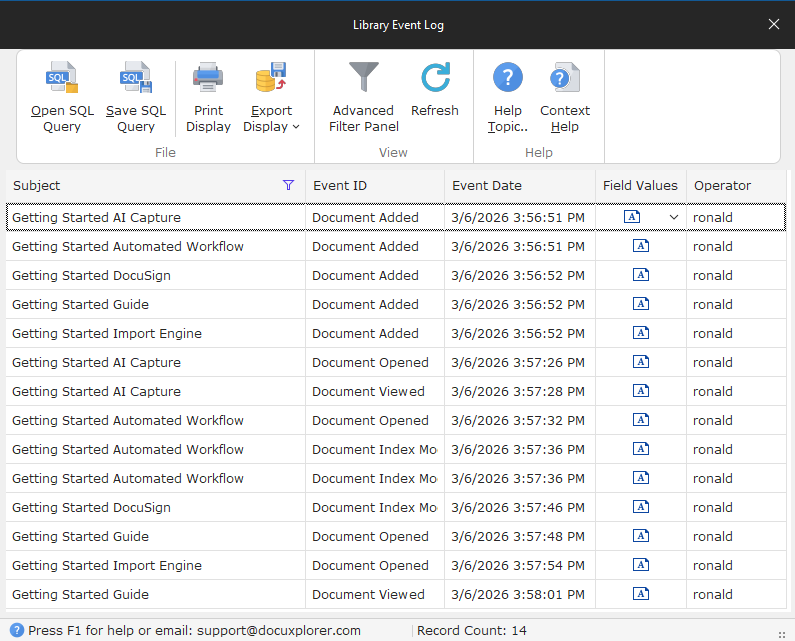
Audit logging usually operates at two interconnected levels: document‑level and library‑level. Document‑level logs show all events tied to a single file, making them ideal when you need to investigate one record in depth. Library‑level logs aggregate activity across every document in a repository, enabling broader analysis by user, department, or time period.
DocuXplorer provides both: a Document Event History that functions as an audit trail for individual files and a Library Event Log that enables higher‑level reporting and oversight. You might use the document view to answer, “Who changed this contract?” and the library view to analyze, “Which teams are generating the most approvals or deletions this quarter?” The ability to filter, print, and export both views makes it easier to share findings with auditors, managers, or security teams.
Putting audit trails into practice starts with choosing the right system. Spreadsheets, email threads, and shared drives alone cannot provide reliable or centralized audit logging because they were not designed to track every action in a structured way.
A DMS offers comprehensive capabilities that general storage tools and industry software don’t: built‑in logging, version control, granular permissions, workflow automation, retention, and reporting.
When evaluating options, it helps to ask specific questions about logging depth (which events are captured), retention options (how long and where logs are stored), and export formats (how easily you can share logs with auditors or integrate them into other tools). Understanding these capabilities up front helps you choose a system to support your compliance, security, and performance goals.
The first step is selecting a system that treats audit trails as a core feature rather than an afterthought. You need automatic event logging for key actions, integrated with version control and access control, so you can see both content changes and usage patterns. The system should support configurable logging to focus on the repositories and event types that matter most to your business.
Role‑based access control means only the right people can view or modify specific document types. This pairs access level with role type and regulatory requirements. When access is structured this way, the audit trail becomes much easier to interpret.
For example, if only a particular group should be editing HR files, any edits outside that group stand out immediately in the logs. Well‑designed roles also reduce noise in the audit trail by limiting unnecessary access, which in turn makes unusual events more visible. In DocuXplorer, role‑based permissions tie directly into audit trails and AI tools, so users only see and query the documents they are authorized to access.
It’s people who ultimately make audit trails useful, which is why training matters. Users should understand that their actions are logged—not as a form of surveillance, but as a way to protect both them and the organization by creating reliable context. When employees know that approvals, edits, and access are recorded, they can rely on that history to clarify misunderstandings and validate their work.
Administrators and managers need to know how to pull event histories to respond to “who touched this?” questions quickly and accurately. In systems that include AI‑assisted search, like DocuXplorer’s AI Insights, teams can query documents and related records in natural language to surface relevant files and audit‑related information faster, while still respecting existing permissions.
From there, maintaining reliable audit trails becomes an ongoing discipline. It starts with aligning logging practices with your policies. From there, periodically review the logs themselves to make sure they reflect how teams actually work and whether policies need to evolve.
Protecting audit logs from tampering is another best practice. Only a small group of trusted administrators should have rights to view, administer, or export system‑wide logs, and the system should prevent users from editing or deleting individual entries. In some environments, this immutability is a compliance requirement, particularly under regulations that demand an unalterable record of access and change.
Regular backups of both the document library and its associated logs should be part of your broader business continuity plan, ensuring that evidence remains available even in the event of system failures or disasters.
Finally, treat audit trail data as a source of insight, not just a monitoring tool. By analyzing logs, you can spot recurring issues and patterns that can inform updates and help you address problems at the root.
Feeding audit and activity insights into strategic planning helps you design processes that are not only compliant and secure, but also efficient and user‑friendly.
Modern DMS tools can accelerate this effort, so you can spend less time reconstructing what happened and more time improving how your organization works.
When you incorporate audit trail reviews into regular security, compliance, and process‑improvement routines, logs become a living resource used to refine operations rather than a static repository checked only during crises.



.png)