
Learn best practices for file naming, folder structures, and electronic file management, plus how solutions like DocuXplorer can handle file management for you.
.png)
As organizations grow, document chaos tends to grow with them. Shared drives sprawl. folder trees get deeper, and file names become cryptic. Suddenly, finding information takes longer than creating it.
Most organizations start with good intentions: a few top-level folders, some logical subfolders, and maybe a few basic naming conventions. But over time, speed takes priority over accuracy.
A strong folder structure doesn’t have to be perfect, but it should be clear, consistent, and scalable. When done right, it makes documents easier to find, processes easier to manage, and growth far less stressful.
In this guide, we’ll break down practical, scalable best practices for folder structures and file naming—plus show how modern document management tools help enforce those rules automatically, so your system stays clean even as your business evolves.
Electronic file management is the strategy and technology used to name, store, organize, secure, and retrieve digital documents.
It goes beyond basic folders on a shared drive. A modern EFM approach combines:
As document volume increases and more people touch the same files, relying on memory or tribal knowledge can lead to misfiling, duplication, and risk, not to mention a lot of time wasted. EFM provides the structure that keeps documents findable, auditable, and secure without slowing teams down.
Search is powerful—especially with modern AI-powered search tools—but file names still do important work.
A good file name gives instant context: what the document is, who it’s for, when it was created, and its status (whether it’s final, draft, or approved). That matters when you’re scanning search results, reviewing a folder, or sharing files externally.
Clear file names also reinforce version control and prevent file duplication. When paired with metadata, which we’ll discuss in more detail later, file naming also improves filtering.
Default names like Scan0001.pdf or Document (3).docx offer none of that clarity and undermine even the best search tools.
Two key components of your file organization are folder structures and naming conventions. They should work together, and neither should be forced to do all the heavy lifting. Let’s first examine best practices for file naming.
File names should describe what the document is or what it relates to. A reliable model can include:
For example: ACME_Invoice_2026-01-15_Paid.pdf
Small formatting choices make a big difference at scale:
The goal is predictability. Clear, consistent naming helps users quickly understand what they’re looking at without opening files.
However, naming conventions only work if everyone follows them. To get your team on the same page and following the same rules, create a short, practical guide that includes the required elements for key document types, optional elements as needed, and real examples people can copy.
Then revisit the standard periodically as new teams, workflows, and document types are added.
Additionally, naming conventions shouldn’t compensate for a confusing folder structure.
Here’s how to design a folder structure that works today and holds up tomorrow.
The biggest mistake organizations make is designing folders around org charts rather than how people actually search for documents.
Effective folder structures reflect business entities like clients, projects, and functions. They also stay shallow enough to avoid endless clicking.
Use folders for broad groupings, not micro-classification. Start by choosing your top-level categories. Most organizations begin with one of these patterns:
In DocuXplorer, these appear as cabinets, the highest-level searchable category. Choosing cabinets thoughtfully is important because they define where users search first.
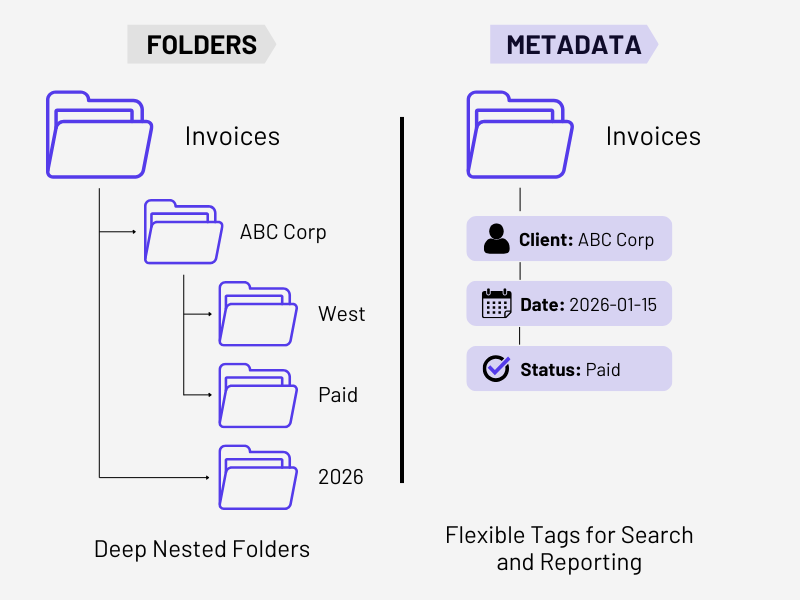
Folders answer the question, “What bucket does this document belong in?”Metadata answers the question, “What exactly is this document?”
Overusing subfolders often makes documents harder, not easier, to find. For example, instead of creating separate folders for every client’s invoices, you might store all invoices in one folder and use metadata fields for client name, date, and status.
DocuXplorer uses index sets—structured metadata fields that are applied to document types. These fields can be searched, sorted, grouped, and auto-populated, giving you flexibility without needing to restructure folders each time something changes.
This approach scales better and supports reporting, automation, and search.
Identify your core document flows, like sales and onboarding, billing, compliance, and audits. Then, for each flow, ask:
Those answers should guide your structure.
A simple model works best:
Document these rules so filing decisions are predictable. You may want to test out your structure with real users and documents, gather feedback, and adjust before doing a broader rollout.
Top-level folders are the foundation of your entire system. If they’re cluttered or overly specific, everything beneath them becomes harder to manage. Once your top-level folders are set, they should remain relatively untouched. Stability at the top gives you flexibility further down, where change is inevitable.
Even the best folder map won’t fix human behavior on its own. People think differently, work under pressure, and take shortcuts. Over time, systems drift, training fades, and rules get ignored.
The real fix isn’t more training or more rules—it’s automation.
The power of automated indexing and filing:
When you have a system that manages the most tedious aspects of file organization, your team can get on with their work and focus on more strategic tasks.
Full-text search allows users to find words inside documents, not just in names or tags. While most document management systems enable full-text search, the latest tools also leverage AI for even more powerful search capabilities.
With DocuXplorer’s AI Insights, users can ask natural-language questions and retrieve relevant documents without knowing exact filing rules. This reduces reliance on perfect filing practices and gives users instant access to what they need to do their jobs.
DocuXplorer is built to make searching and document retrieval effortless.
Together, these capabilities allow organizations to implement EFM best practices that scale without becoming rigid or brittle.
Platforms like DocuXplorer allow organizations to maintain a logical folder structure while layering in smarter controls—automatic classification, versioning, access rules, and advanced search. The result is a system that feels familiar to users but operates with precision behind the scenes.
Ultimately, the best filing model is the one people actually use.
That means minimizing decisions, reducing ambiguity, and building systems that guide users instead of policing them. When documents are easy to file correctly, compliance improves naturally.
By combining simple rules, logical hierarchy, metadata, and powerful search, organizations can dramatically reduce time spent searching, misfiling, and recreating documents.
A cloud-based document management system like DocuXplorer makes this easier by enforcing standards behind the scenes, so your structure stays intact as your business grows, changes, and modernizes. A folder structure isn’t something you design once and forget. It should evolve as your organization grows, your processes mature, and your technology improves.
If you’re ready to move beyond shared drives and manual filing, DocuXplorer gives you the tools and best practice guidance to make electronic file management work the way it should.
Curious to see if DocuXplorer is a fit for your organization?



.png)