Metadata tagging streamlines document workflows, boosts searchability, and supports audits. Here are best practices for using metadata and how you can automate the process with DocuXplorer.
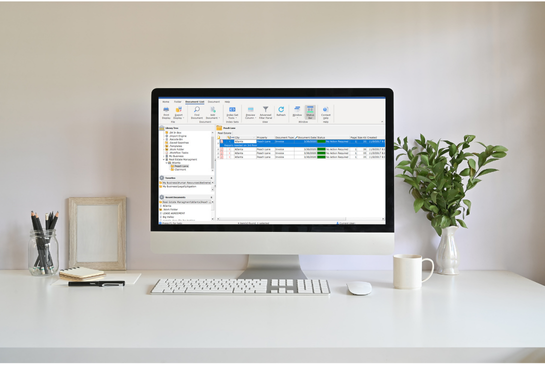
Metadata tagging is a cornerstone of effective document management. At DocuXplorer, we've spent more than 20 years helping organizations organize invoices, contracts, HR files, engineering drawings, and compliance records using metadata that makes documents instantly searchable instead of buried in folders.
Attaching descriptive information, known as metadata tags, to digital documents lets organizations create essential structure and context that go far beyond what folders or file names can provide. This approach enables search and retrieval and helps achieve consistent organization across departments and information ecosystems.
More than just names or folder locations, metadata tags provide essential context and structure, laying a foundation for rapid identification, retrieval, and analysis of your digital assets. In modern document management, a robust metadata strategy separates efficient, scalable businesses from those mired in digital clutter.
For many organizations, relying solely on folders or file names can lead to document sprawl—a situation where essential files become lost, duplicated, or misplaced.
This not only slows down workflows but also exposes your business to compliance and operational risks.
Metadata tagging offers a practical solution: with standardized tags, documents and assets become instantly findable and consistently organized, regardless of their physical location within the system.
Metadata tagging, also referred to as indexing, is the process of adding descriptive information to documents to improve their usability. These tags provide instant context, turning generic files into highly accessible and actionable assets.
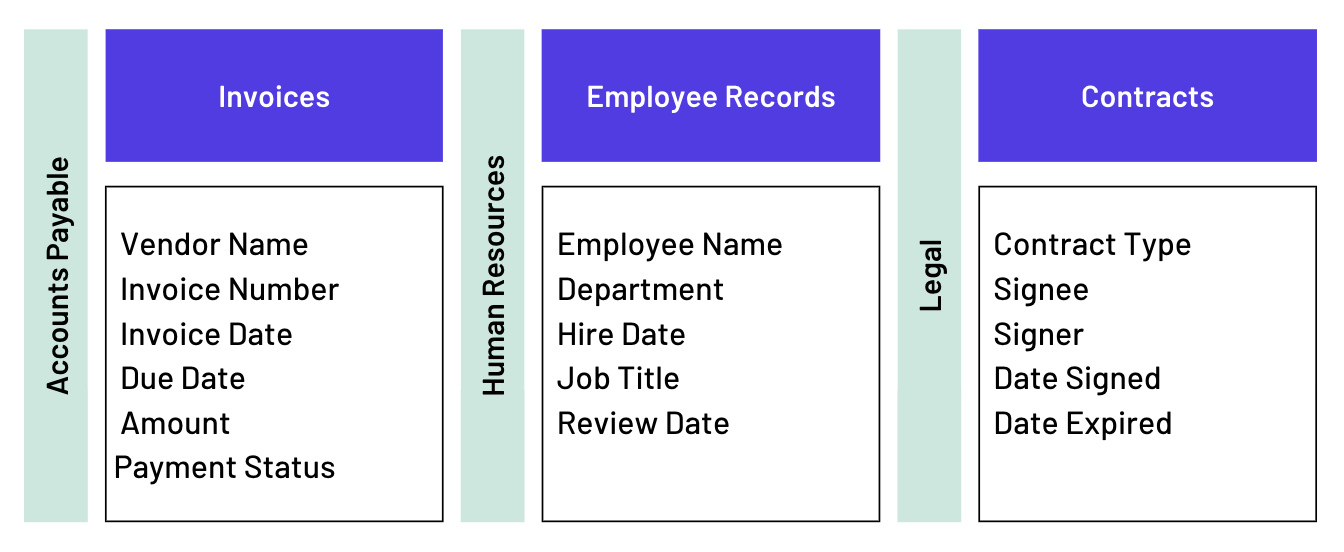
In DocuXplorer, these metadata fields (called index sets) are tailored to each document type, so an invoice captures different information than a contract or employee record.
Instead of wading through countless folders, users can find what they need in seconds by filtering or searching based on these fields or index sets.
A metadata tagging system can help ensure that all your digital assets are standardized. In document workflows, metadata tags can include anything meaningful to the organization, such as:
Without metadata, finding information is inefficient and prone to errors. With metadata tagging in place, businesses experience:
For example, an accounts payable team might search every invoice from a specific vendor over $5,000, while an HR team could instantly retrieve employee certifications that expire this quarter. This is the kind of day-to-day retrieval metadata is designed to support.
Internally, this translates to faster decision-making—teams quickly access the documents they need, leading to smoother operations and reduced frustration. Effective metadata tagging also gives an organization the ability to scale document management practices as its data grows.
Despite its benefits, metadata tagging also presents some challenges:
To overcome these challenges, businesses can focus on five strategies:
To maximize the effectiveness of metadata tagging:
Tools like DocuXplorer support these best practices with automation capabilities and tailored business process consulting—reducing the friction for your business and ensuring long-term organization.
A common pattern we see: Many organizations actually already have a filing structure—they just don't have a metadata strategy. Teams often create folders by department or project, but invoices, contracts, and compliance records still become difficult to find because the information inside the documents isn't indexed consistently. Metadata fills that gap.
By creating document filing rules, also referred to as taxonomies, you can standardize the keywords used to refer to specific values in your documents, avoiding irregular metadata tagging. With predetermined taxonomies, also known as static lookup, your system administrator can control which keywords are used to describe specific index fields (e.g., “invoice” versus “bill”).
Docuxplorer provides categories of metadata (index sets) tailored to different document types, so your index set fields for invoices will be different from your index set for contracts:
Pairing a thoughtful document taxonomy with metadata tagging is what sets a true document management system apart from basic storage. Taxonomy ensures documents are filed consistently; metadata tagging allows instant, nuanced retrieval. Together, they create a scalable environment where files are always easy to find and workflow bottlenecks become a thing of the past.
A taxonomy is the difference between a basic document repository like Google Drive (the digital version of a filing cabinet) and an actual management system that improves your business processes.
Instead of relying on employees to remember filing rules, DocuXplorer uses metadata to organize documents around how people actually work. Index sets, automated capture, and workflow rules help invoices, contracts, HR records, and compliance documents become searchable the moment they're imported.
Metadata goes beyond file naming—it provides context and structure to your digital assets.. With a well-designed system—especially one powered by automation and expert guidance—your organization can move faster, stay compliant, and empower every team member to work at their best.
Getting started is easy with the right partner. DocuXplorer provides options for expert taxonomy consulting and automated metadata tagging, leveraging more than 20 years of experience to craft custom frameworks for any industry.
Here’s how DocuXplorer makes it simple:
With these tools, document chaos is replaced by a scalable information ecosystem that does the tagging, data entry, and filing for you, so you can move on with your work.
If you're evaluating how to organize thousands of business documents—not just where to store them—seeing a real metadata strategy in action is often more helpful than another checklist.
See how DocuXplorer automatically tags, organizes, and retrieves documents in a personalized demo.

.png)