
Document taxonomy revolutionizes your file organization and empowers your most important business processes. Read on for examples of taxonomy and its uses.

Digital documents are great…if you can find what you need when you need it. Taxonomy is utilized in document management solutions to streamline an organization’s file structure and make files easy to find.
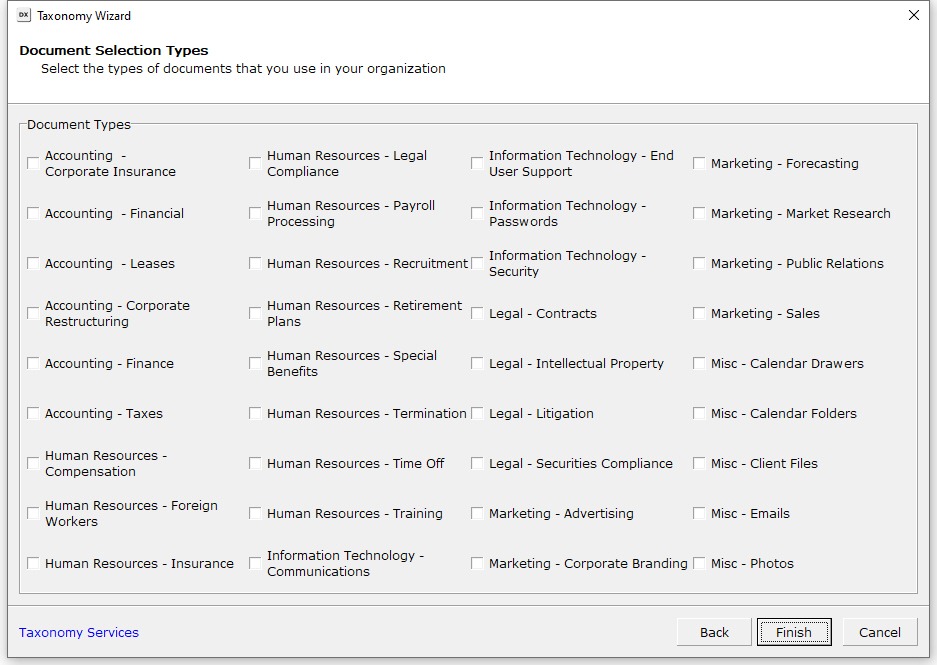
What is taxonomy? At a high level, taxonomy consists of your file configuration (folders, subfolders, etc.) and indexing information (a way of profiling your documents so you can organize and search effectively).
With DocuXplorer, different members of your team can quickly find any file without knowing where, how, or why it’s saved the way it is.
Taxonomy underpins your file organization and enables maximum search functionality. You can perform high-level or granular searches and find what you need reliably every time.
The right taxonomy sets you up for success. As your secret sauce, taxonomy improves employee training and eliminates information bottlenecks. Your staff can find the information they need to do their jobs faster and easier. When onboarding new employees, quickly get them up to speed with an intuitive system that aligns with your business processes.
Want to know how many invoices are due this week? Or how many employee certifications expire next month? You’ll be reporting on a high level, finding patterns and opportunities to improve your business.
Taxonomy helps facilitate file retention policies and keeps you proactive. For example, if you need to purge files X years after their "close" or “complete” date, you can create and save a custom search and run it regularly to keep your DMS current.
By staying proactive in document management, businesses can avoid accumulating obsolete data and reduce their exposure to legal and regulatory risks associated with data breaches or non-compliance.
A proper taxonomy will also serve as the foundation for automated processes. Once set up, your unique taxonomy enables your DocuXplorer library to:
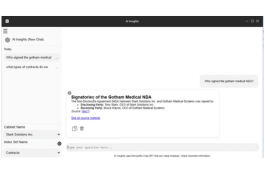
You might be wondering if taxonomy and metadata even matter anymore in today’s AI-driven world. It’s a valid question—even DocuXplorer now offers AI chat as a more streamlined way to search and retrieve documents using natural language questions.
But even with powerful AI chat tools, it's the taxonomy and metadata that give your documents context and meaning. AI can read full text, but without consistent indexing and classification, it has a harder time understanding which documents are current or relevant for a specific question.
Metadata like document type, owner, client, date, and status tells AI not just what a document says, but how it should be used. This context improves AI ranking, reduces irrelevant hits that happen to share keywords, and helps prevent the wrong documents from appearing in an answer.
Open‑ended prompts (e.g., “What should we do about safety?”) can generate answers that blend multiple disciplines or outdated content. When your library is indexed by department, project, lifecycle stage, and geography, AI can narrow its focus and answer questions within the right slice of your information.
Also, when your content is organized into trusted collections, with clear owners and versions, AI can be constrained to answer from approved sources instead of guessing.
Metadata such as version, approval status, and effective dates helps AI avoid citing superseded policies or consulting unfinished or archived documents as if they were the single source of truth.
AI can assist with auto‑tagging and pattern detection, but humans define the taxonomy, controlled vocabularies, and maintain the rules that keep results relevant and compliant.
Organizations that rely solely on AI, without clear classification and governance, risk amplifying bad data, inconsistent terms, and security or privacy gaps.
DocuXplorer’s own AI features work best when they are grounded in a well‑designed taxonomy, combining full‑text and semantic analysis with the structure, security, and metadata your team already depends on.
While taxonomy works similarly across departments and industries, partnering with an expert means your taxonomy is customized for your business needs. The best taxonomy for you will be smartly designed to match your business processes while being fluid and adaptable as your business grows and changes.
A taxonomy expert maps the records vital to your organization and the information on those records that’s key to locating them. Partnering with DocuXplorer means you’ll have everything you need to set up quickly so your team can benefit from a streamlined system.
Every business structure, whether simple or complex, can benefit from the power of taxonomy, as it allows you to control your most important asset: your data.
Here are some examples of various taxonomies and how they relate to specific business functions:
This is one of the simplest forms of taxonomy, where documents are organized into folders and subfolders based on categories, projects, departments, or other logical classifications. For example, a folder structure might have top-level folders for departments like HR, Finance, Marketing, etc., and subfolders for each project or document type within those departments.
In digital document management, folder hierarchy is still needed, but it must be simple enough that both AI and humans can map it easily.
Documents are tagged with metadata such as author, creation date, keywords, document type, etc. Users can then search and filter documents based on these metadata tags. Metadata allows more granular search and retrieval and optimizes everything from file organization to workflows to reporting.
Documents are organized into categories based on their content type or subject matter. For example, in a legal document management system, documents might be categorized into sections such as contracts, briefs, and case law. An educational institution's documents might be categorized into math, science, and history subjects.
Hierarchical taxonomy means that documents are organized based on their relationships. A product documentation system, for example, can organize documents by product categories, with subcategories for different product features or versions.
Documents are organized based on their functional relevance or usage within an organization. This might include grouping documents by workflow stage, approval status, or document lifecycle phase. For instance, documents might be categorized as drafts, under review, approved, or archived.
In multinational organizations or those with operations in multiple locations, documents can be organized based on geographical regions, offices, or branches. This ensures that documents relevant to specific locations are easily accessible to stakeholders.
Create custom taxonomies tailored to your organizational needs by leveraging DocuXplorer’s expert taxonomists. You can build unique classification schemes based on industry-specific terminology, project structures, or regulatory requirements.
Taxonomy is your business’s ticket to becoming a well-oiled machine. It ensures your documentation is not just stored but strategically managed.
By leveraging a well-structured taxonomy, you'll avoid digital clutter, save time and money, mitigate risks, and uncover new growth opportunities.
DocuXplorer consultants have over two decades of experience in document management taxonomy and the skills to design and implement powerful solutions to optimize your business process strategies.
The possibilities are endless.


.png)