
Document management for law firms keeps your documents organized, secured, and quickly accessible. It also easily integrates with any in-house case management software.

Legal services clients expect personal and accurate communications from their providers. They want each interaction, such as a receipt or addendum, to be timely and efficient. Law firms that deliver a personalized experience have higher customer retention rates and maximize the potential long-term value of these customers.
Document management software for law firms should improve customer relationships while optimizing operational efficacy. When you need to send a particular document to a client, it should take seconds rather than hours or days hunting through stacks of paper.
Leveraging DocuXplorer as a partner, law firms will keep their client records organized with intuitive, user-friendly, and robust software to support all the firms’ needs.
Legal work depends on having the right information available at the right time. Attorneys and support staff need to locate documents quickly, keep case materials organized, and know they're working with the correct version.
A document management system (DMS) works alongside case management software to support these needs. While case management tools help attorneys track matters and deadlines, a DMS manages the documents behind that work.
With DocuXplorer, law firms can organize case-specific materials—including legal research, pleadings, affidavits, correspondence, client records, and notes—in a centralized library. Documents can be indexed by client name, matter, creation date, document type, or other relevant information, making it easier to find what you need without remembering exactly where a file is stored.
Built-in version control and audit trails also help teams track document changes and maintain a history of prior versions.
If you utilize a secretary or virtual phone answering service to track phone calls, you can leverage DocuXplorer to send you notifications when you have calls to return. The call information is routed from email into a folder, and AI Capture picks up the client name, contact details, and notes. Rather than work off post-it notes or paper legal pads, you can go through the list, return calls, change statuses, and add or edit notes, all in one place.

A well-organized document management system can support several important parts of a law firm's daily operations.
Searching for misfiled or incomplete documents—or repeating searches across multiple locations—can take valuable time away from legal work.
DocuXplorer lets firms organize documents using metadata that reflects how their teams work. A legal brief, for example, might be indexed by client, case number, document type, and date. Staff can then search using relevant details or document contents to locate the information they need.
Firms can also store information about physical assets, such as evidence, alongside digital case records. This provides a more complete view of the materials associated with a matter.
Law firms rely on a range of applications to manage client information, finances, communications, and daily operations. A DMS should complement those tools rather than create another disconnected place to manage information.
DocuXplorer supports workflows with Microsoft Office and email, allowing users to bring documents and correspondence into their document library. Email monitoring can route client documents or research into DocuXplorer, where users can organize the files manually or use built-in automation to apply relevant metadata.
These connections help reduce repetitive filing tasks and keep important case information together.

Incoming documents often contain information that staff would otherwise have to review and enter manually. AI Capture helps automate that process by extracting relevant information from documents and emails.
For legal teams, this can support workflows such as organizing incoming correspondence, capturing client contact details, and routing information into the appropriate records. Instead of manually copying information between systems or tracking follow-ups on paper, staff can work from organized records and focus on the next action.
Finding a document is only part of the job. Legal professionals also need to understand what documents contain, identify relevant facts, compare information across filings, and prepare arguments.
DocuXplorer's AI Insights adds a conversational way to work with documents in the library. Rather than opening files one at a time, users can ask questions in natural language and get responses based on the documents they have access to.
For legal teams, this creates opportunities to use AI chat throughout the lifecycle of a case.
Summarize complaints, answers, and other filings. A legal professional can ask AI Insights to summarize a complaint and receive an organized overview of the parties, alleged incident, claimed injuries, legal theory, and requested relief. They can then ask a follow-up question about the defendant's answer and affirmative defenses.
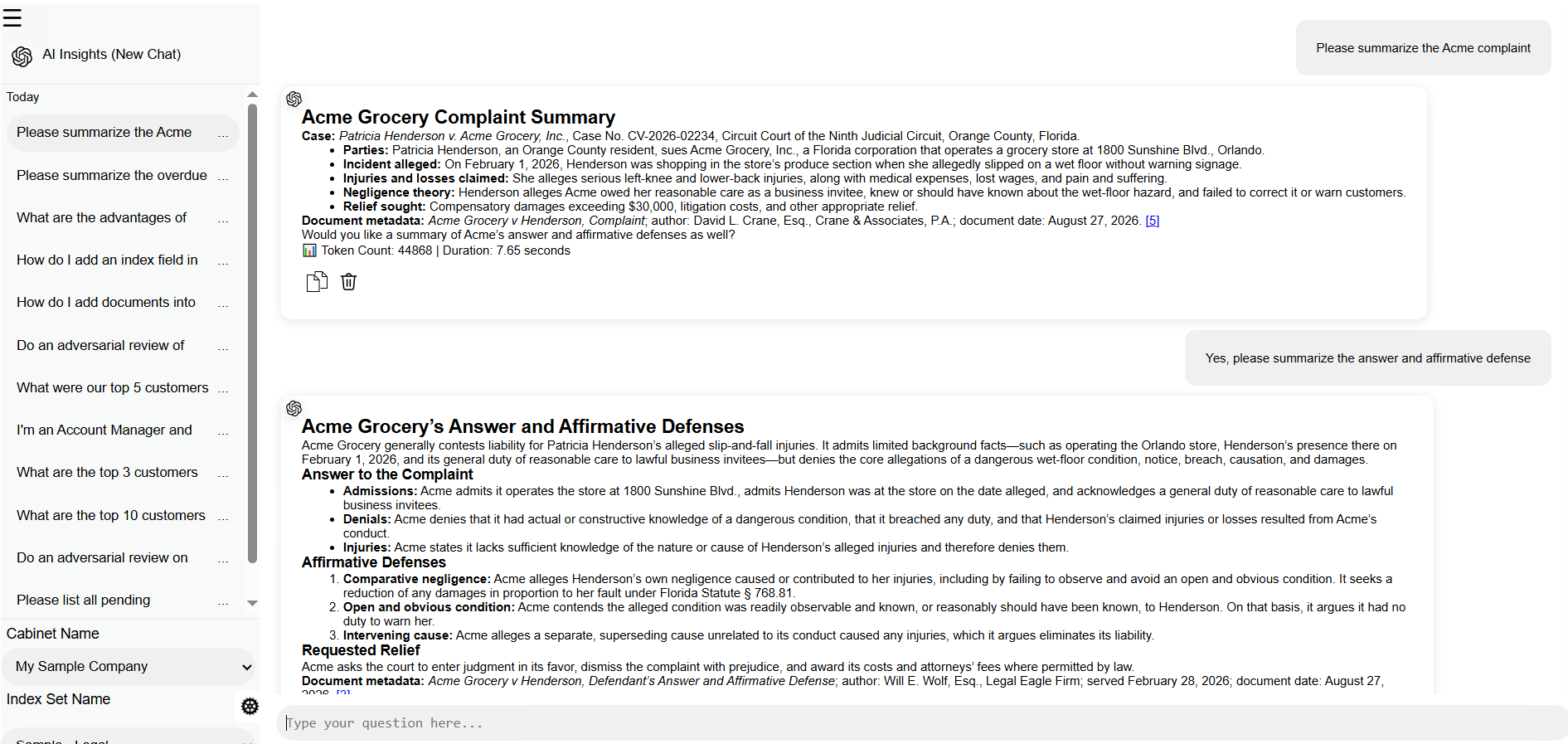
This can help attorneys and support staff get oriented to a matter, review lengthy filings more efficiently, and identify the issues that may need closer attention.
Review arguments and identify potential weaknesses. AI Insights can also help users examine a draft legal filing from another perspective. For example, a user can request an adversarial review of a motion to suppress. The resulting analysis can identify missing factual details, potential gaps in the legal argument, likely opposing responses, and opportunities to make the motion more specific or complete.
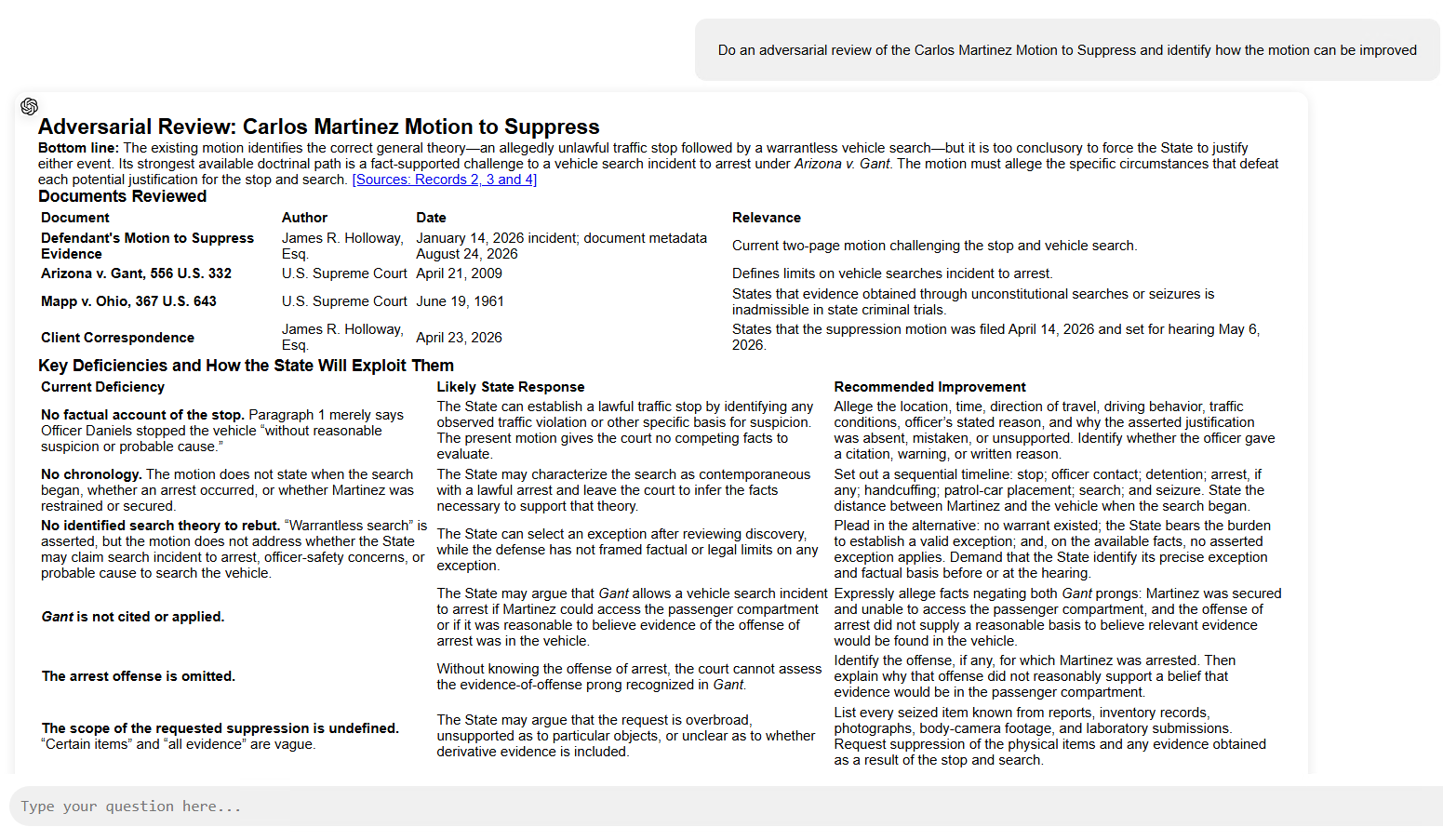
This type of review can help attorneys spot questions they may want to investigate before finalizing a filing. It can also provide a starting point for evaluating how an opposing party might challenge an argument.
Ask follow-up questions and explore case information. Because AI Insights uses a chat interface, users can continue the conversation rather than starting a new search for every question. They can ask for clarification, explore another aspect of a filing, or request a different summary of the available information.
AI-generated responses are a starting point for review, not a substitute for legal judgment. Attorneys should verify factual statements against the underlying records and independently confirm legal authorities, citations, and conclusions before relying on them in legal work.
By combining document management with AI-powered chat, DocuXplorer helps legal teams move beyond simply storing and retrieving files. They can also interact with the information in those files to support research, review, and case preparation.
Law firms handle highly sensitive client information, making security a fundamental requirement of document management. Teams need to make information accessible to authorized users without exposing confidential records to everyone in the organization.
DocuXplorer provides document permissions that allow firms to control who can access and work with specific files and folders. User groups can help administrators manage access according to roles and responsibilities, while version control helps preserve document history and reduce confusion over competing drafts.
Additional security capabilities support the protection and management of firm records:
These controls help firms manage confidential client information while giving attorneys and staff access to the documents they need.
For a closer look at protecting business records, see our articles on document security and compliance document management.
Moving a firm's documents into a new system can feel like a significant undertaking. The right document management partner should provide more than software: it should help your team organize information, establish workflows, and get comfortable using the system.
DocuXplorer provides onboarding, training, and professional services to help firms make the transition. With expert guidance, your team can configure the system around its document management needs and begin putting it to work in everyday processes.
For firms with remote or hybrid teams, DX Cloud also provides access to authorized documents from different locations, helping attorneys and staff stay connected to the information they need.
A law firm's work depends on creating, reviewing, revising, and understanding documents. Managing those documents shouldn't take more time than the work itself.
With DocuXplorer, legal teams can organize case records, automate routine document tasks, maintain control over sensitive information, and use AI Insights to summarize and examine the contents of their documents.
The result is a more organized way to manage legal information—and more time for the work that matters to your clients.
Ready to see how DocuXplorer could support your firm's workflows?


