
Learn how to reduce accounts payable risk, prevent bogus invoices, and improve invoice accuracy with automated data capture, approval workflows, supplier validation, and ERP integration.

Accounts payable teams have always had to balance efficiency and accuracy. Today, they also have to contend with a growing range of risks: fraudulent invoices, vendor impersonation, duplicate payments, unauthorized approvals, altered documents, and increasingly sophisticated email scams.
Many of these risks exploit the weaknesses in manual accounts payable processes. When invoices arrive by email, data is entered by hand, approvals happen in inboxes, and documents are stored across different systems, it becomes difficult to know whether an invoice is legitimate, who approved it, and whether the invoice being paid is the same one that was originally reviewed.
Invoice fraud prevention requires controls throughout the invoice lifecycle—from submission and data capture to validation, approval, and payment.
Automating the process can help organizations reduce AP risk while also improving accuracy, visibility, and efficiency.
Accounts payable fraud occurs when someone intentionally manipulates the invoice or payment process to cause an organization to make an unauthorized payment.
One common example is a bogus invoice: a fraudulent request for payment made to look like a legitimate business expense. But invoice fraud can take several forms, including vendor impersonation, duplicate invoices, altered payment information, and fraudulent approval requests.
Not every AP problem is necessarily fraud. A duplicate invoice might be submitted accidentally. An employee might enter the wrong invoice amount. A legitimate invoice might be passed to the wrong person for approval.
But from an organization's perspective, these mistakes create many of the same financial and operational risks. Money can leave the business incorrectly, records can become inaccurate, and it may be difficult to determine what happened afterward.
That's why effective AP risk management focuses on both fraud prevention and process control.
The invoice itself isn't necessarily the weak point. Often, risk enters through the processes surrounding it.
Consider a typical manual workflow.
Every touchpoint and handoff creates an opportunity for something to go wrong.
The more manual the process, the more dependent the organization becomes on people noticing problems at each individual step.
A well-designed AP workflow takes the constant need for human oversight out of the equation and builds controls into the process itself.
Manual data entry creates a straightforward AP risk: someone has to read information from an invoice and enter it into another system.
Even an honest mistake can have consequences. A transposed number, incorrect invoice total, or wrong vendor record can result in an incorrect payment or make it harder to identify suspicious activity.
Automated invoice data capture reduces this risk by extracting information directly from the document. Instead of manually keying every field, organizations can capture vendor names, invoice numbers, dates, totals, and other relevant data (metadata) and associate it with the invoice automatically.
This doesn't eliminate the need for review, but it makes the data entering the workflow more consistent and gives AP teams a better foundation for the controls that follow.
It also creates structured information that can be used for validation, searching, reporting, and duplicate detection.
While many organizations use email for approvals, it isn't an ideal system.
A fraudulent invoice accompanied by a convincing spoofed email from a CFO or other executive can potentially result in an unauthorized payment.
A controlled workflow through a secure system changes the process entirely.
With a document management system like DocuXplorer, invoice approvals happen inside the system by authenticated users with the appropriate credentials and permissions. Rather than treating an email as the approval record, the system records the approval as part of the invoice's workflow history.
This provides a much stronger control: the organization knows which authenticated user approved the invoice and when.
The approval is also recorded in the audit trail, creating a reliable record that can be reviewed later.
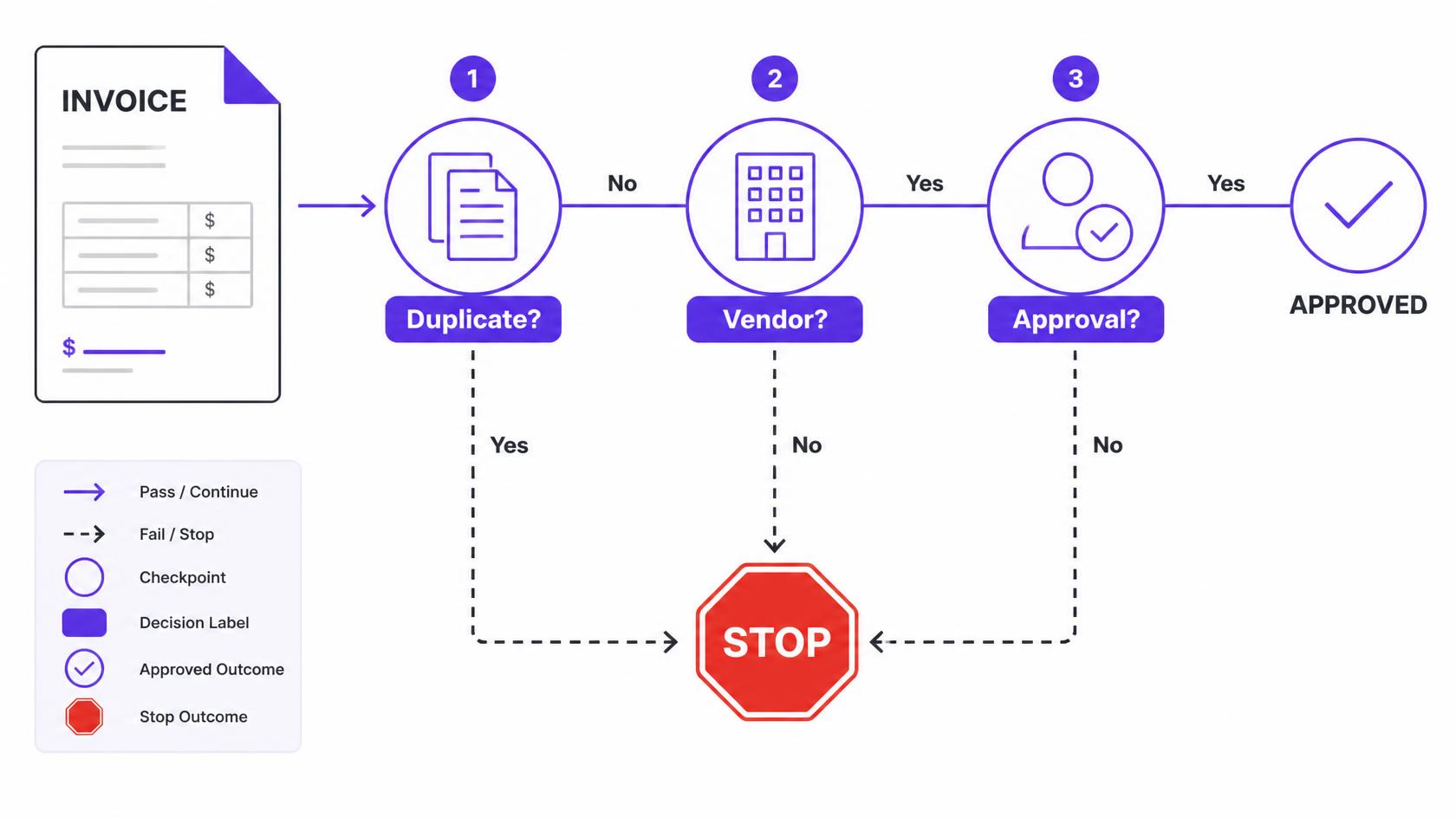
Vendor impersonation doesn't always involve a completely fictitious company.
A fraudulent invoice may use a name that looks almost identical to a legitimate supplier. For example, an invoice might come from "Acme Supplies Co." when the company's approved vendor is "Acme Supply Co." To a person processing hundreds of invoices, the difference may be easy to miss.
Supplier validation provides another layer of protection.
DocuXplorer can match invoice information against defined supplier data sets and approved vendor records. If an invoice doesn't correspond with an expected supplier, it can be flagged for review rather than simply moving forward as if it were legitimate.
This is particularly useful because AP teams shouldn't have to rely entirely on visual inspection to recognize suspicious vendor information.
The system can apply defined rules consistently, helping separate routine invoices from those that require additional attention.
Strong AP controls depend on more than knowing what an invoice says. Organizations also need to control who can perform each action.
Without appropriate permissions, someone could potentially submit an invoice, change information, or move a document farther through the approval process than their role allows.
DocuXplorer uses role-based permissions to control access to different functions. Organizations can determine which users have the authority to submit invoices, create purchase orders, approve invoices, or advance documents through a workflow.
This supports the principle of separation of duties: the person entering or submitting an invoice doesn't necessarily need to have authority to approve it.
For example, a purchasing employee may be able to create a purchase order while a department manager approves an invoice and another authorized person handles the next stage of the process.
These controls reduce the opportunity for someone to bypass established financial procedures.
Approval policies often depend on different factors: invoice amount, department, project, type of expense, or others. The problem arises when those policies exist only in someone’s memory.
An invoice requiring two approvals shouldn't be able to reach payment because someone forgot to involve the second approver.
With DocuXplorer, workflows can be configured around your organization's specific rules. Approval steps are enforced in sequence, so an invoice cannot simply skip ahead because someone is in a hurry or because the approval request got lost.
For example, an organization might require:
The system turns these policies into an actual process rather than relying on employees to manually enforce them.
Duplicate invoices are another common AP risk. Sometimes they happen accidentally: a supplier sends an invoice twice, or an employee submits a document that someone else has already entered.
In other cases, duplicate submissions can be intentional. Either way, paying the same invoice twice is an avoidable financial loss.
DocuXplorer can automatically flag duplicate invoices based on information such as the vendor name and invoice number. That gives AP teams an opportunity to investigate before the duplicate proceeds through the payment process.
This is also an area where DocuXplorer's AI Insights can be useful. Insights Chat can surface duplicate or potentially related invoices when users need to investigate a question about their documents.
The result is a second layer of protection: automated detection can identify patterns that might otherwise depend on someone noticing a duplicate manually.
Imagine that an invoice is legitimate when it enters the AP process. It goes through the required approvals, but the document is subsequently changed before payment. The amount is different. Payment information has been altered. Or a different version of the invoice is substituted.
If the organization doesn't maintain a reliable document history, determining what was actually approved can become difficult.
Document integrity and version control address this risk.
In DocuXplorer, documents are locked once ingested, while version history provides a record of changes. If a document is modified, that modification is tracked. That creates an important distinction between storing documents and maintaining control of them.
The goal is straightforward: what was reviewed and approved should be traceable to the document that ultimately moves through the process.
Even the strongest preventive controls can't guarantee that fraud or mistakes will never happen. That's why visibility after the fact matters, too.
When an organization discovers an unusual payment, the first questions are often:
Who submitted the invoice?
Who opened it?
Who approved it?
Was anything changed?
What happened immediately before the payment?
If those answers require searching through email threads, shared folders, spreadsheets, and accounting records, an investigation can become slow and inconclusive.
A centralized audit trail gives you a much clearer picture.
With DocuXplorer, you’ll automatically record activity associated with documents and workflows, including actions like opening, approving, and modifying documents. This creates a chronological record that can support your team’s internal reviews, audits, and investigations.
It also changes the behavior of the process itself. When actions are attributable to authenticated users and recorded in the system, there is much less ambiguity about who was responsible for each step.
Document management and workflow controls become even more useful when they're connected to the systems that contain an organization's financial data.
Your ERP or accounting system may contain the authoritative information about suppliers, purchase orders, accounts, and transactions. Keeping invoice processing disconnected from those systems can create unnecessary manual work—and another opportunity for errors.
DocuXplorer can integrate with finance and ERP systems so invoice workflows can work alongside the organization's existing data.
For example, invoice information can be checked against established supplier and purchasing data rather than being treated as an isolated document.
This helps create a more connected process:
.png)
The exact workflow will vary by organization, but the underlying principle is the same: the more effectively your systems share reliable information, the fewer opportunities there are for discrepancies to go unnoticed.
Purchase orders are another important part of AP risk management.
If employees can freely create or modify purchase orders without appropriate controls, a fraudulent or unauthorized invoice can be much harder to identify. A purchase order may appear to provide legitimacy even when the underlying transaction hasn't been properly authorized.
Role-based permissions and workflow rules can help ensure that purchase orders are created and approved by the appropriate people. So the PO itself will originate through an authorized process.
That provides an additional control before an invoice ever reaches the payment stage.
It's easy to think about AP automation primarily in terms of efficiency. But automation can also fundamentally change the risk profile of an AP process.
Instead of asking employees to manually check every invoice for every possible problem, organizations can establish rules that consistently apply throughout the workflow.
That means:
Instead of using one-off controls, these things together help you create a fully secure system with multiple built-in opportunities to catch bogus invoices.
To expose weaknesses in your process, ask a few basic questions about how invoices move through your organization:
If the answer to several of these questions is no, there may be opportunities to strengthen your AP controls.
The goal isn't necessarily to add more manual checkpoints. In many cases, the better approach is to build those controls directly into the workflow.
Effective invoice fraud prevention shouldn't require AP employees to become detectives.
The strongest processes make the secure path the easiest path. Invoices are captured automatically, supplier information is validated, permissions determine who can take action, approval rules determine where documents go, and the system maintains the history along the way.
That approach helps address deliberate fraud while also preventing the everyday errors that create financial and compliance risk.
DocuXplorer brings these controls together within a centralized document management and workflow environment. By combining automated invoice capture, configurable permissions and approval workflows, supplier validation, duplicate detection, document version control, ERP integration, and complete audit trails, organizations can create a more controlled and transparent AP process.
The result isn't just fewer fraudulent invoices. It's a process where AP teams have greater confidence that the right invoice is being reviewed, by the right people, in the right order—and that there is a reliable record of what happened at every step.


.png)