Compare cloud vs. on-premise document management systems. Discover critical decision factors, cost breakdowns, and the top 10 DMS solutions for businesses seeking secure, scalable document hosting.

Choosing a document management system is about more than storage and features. Where your information lives, who controls it, and how easily your team can access what they need to work will impact everyone’s day-to-day.
For a long time, the question was simple: Do we keep documents on our own servers, or move everything to the cloud? Today, that decision has larger implications. It affects how your team collaborates remotely, how you meet compliance requirements, how quickly you can scale, and how much control IT really has over sensitive data.
As organizations generate more digital content and hybrid work becomes the norm, document management deployment is no longer a back-office IT choice. It’s a strategic decision that can either remove friction from daily work or quietly introduce risk, cost, and complexity.
This guide breaks down cloud, on-premise, and hybrid document management models in plain terms, so you can confidently choose the option that fits your organization today—and won’t box you in tomorrow.
A document management deployment model simply describes where your DMS runs and where your documents are stored. That could be on your own servers, in a vendor’s cloud, or both.
This choice influences everything from security and uptime to how easily your team can collaborate, especially if they’re working remotely.
Let’s break each option down to explore its benefits and drawbacks.
Cloud DMS runs on infrastructure managed by the vendor or a hosting provider and is accessed over the internet, typically with a browser or desktop app, with a subscription pricing model. The provider handles server maintenance, backups, and upgrades, and new features are added without requiring the user to install them. For many teams, cloud DMS feels familiar—it works much like other SaaS tools your team already uses.
Key benefits of operating in the cloud include faster deployment, lower upfront spend, easy scalability, and strong support for remote and distributed teams. On the other hand, keeping all your institutional knowledge in the cloud means relying on a reliable internet connection, limited control over infrastructure, and the need for careful due diligence on how your data is secured or audited.
On‑premise DMS runs on servers you own and manage in your facilities or your private hosting environment, with your IT team handling configuration, updates, backups, and security. This model usually requires higher upfront investment in hardware and licenses, but gives you tight control over performance, data residency, and change management.
For some organizations, this choice isn’t about resisting the cloud—it’s about maintaining control where it matters most. Organizations often choose on‑premise when they handle highly sensitive information or operate under strict regulatory or data‑sovereignty rules, such as government, education, defense, and some financial services.
Trade‑offs include more complex upgrades, heavier IT staffing needs, and extra work to support secure remote access compared with purely cloud‑based tools.
Many organizations look for deployment flexibility so they can adapt over time rather than locking into a single model. Hybrid DMS offers flexibility by combining cloud and on‑premise: for example, keeping current or sensitive records on‑premise while using cloud storage for archives, sharing, or disaster recovery.
Rather than forcing an all-or-nothing decision, flexible deployment lets organizations evolve their strategy as regulations, infrastructure, or team needs change.
Some platforms, including DocuXplorer, allow you to self‑host in your own cloud or on your own servers, which is attractive if you want direct control while still leveraging modern infrastructure and integrations—more on this later.
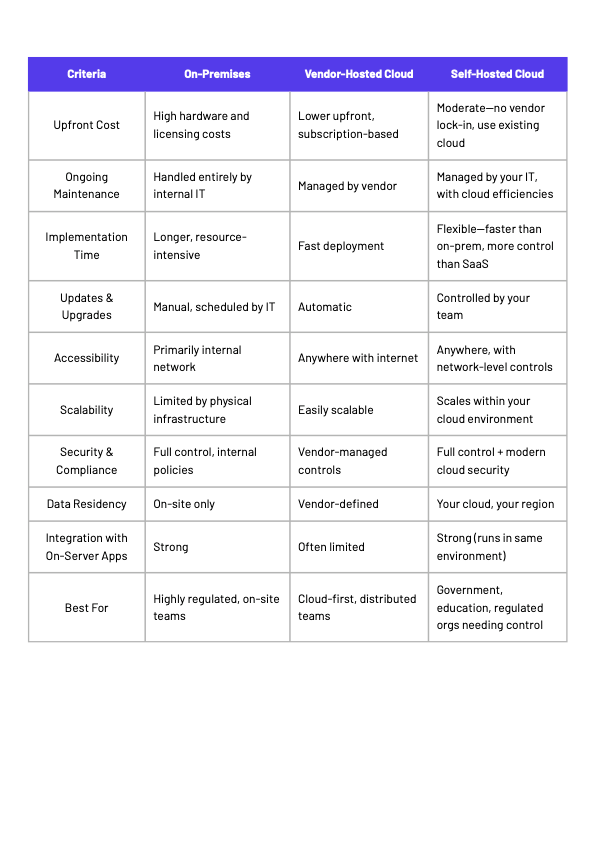
At a basic level, cloud vs. on-premise vs. hybrid document management comes down to how much control you need, how you prefer to spend your IT budget, and how tightly you must manage risk, compliance, and remote access. A good question to ask yourself is: who ultimately needs to answer (and how quickly) when an auditor asks where your data lives and who accessed it?
Security and compliance should be the first filter when choosing a DMS model. Evaluate encryption (in‑transit and at‑rest), identity and access management, audit trails, retention policies, data‑residency options, and alignment with frameworks like HIPAA, FINRA, GDPR, or FIPS, depending on your industry.
Cloud vendors often offer strong, professionally managed security and compliance certifications, but you must ensure their controls align with your regulatory requirements. On‑premise or self‑hosted deployments let you customize security controls and keep data under your full governance, but keep in mind that your IT team is still responsible for patching, monitoring, and enforcing policies.
On‑premise deployments require upfront spending on servers, storage, licenses, and often higher initial implementation work. They can be cost‑effective over time for stable, large user bases if you already have a strong IT infrastructure and in-house expertise; however, organizations relying on homegrown database systems often find themselves stuck in technical debt when their systems can’t keep up with business growth.
Cloud DMS typically shifts spending from capital expense (hardware, perpetual licenses) to operating expense (subscriptions), with monthly or annual fees based on the number of users, storage tier, and features.
When comparing options, account for hidden or indirect costs such as upgrades, customizations, IT staffing, security tools, backup, and disaster‑recovery infrastructure, downtime, and potential vendor price increases.
Ultimately, keep in mind that the cheapest option on paper isn’t always the most affordable in practice—especially if it slows down automation, integrations, or growth.
Cloud systems generally scale up or down quickly. You can add users or storage without buying new hardware, which makes them attractive for growing or seasonal businesses. On‑premise systems scale more slowly and may require expanding hardware or redesigning architecture, but they can offer predictable performance when carefully sized.
Hybrid and flexible‑deployment platforms help future‑proof your investment by allowing you to start on‑premise (or in your own cloud) and move workloads toward vendor‑hosted or hybrid models over time without replacing the DMS itself.
Cloud DMS is inherently remote‑friendly: users log in securely from anywhere with an internet connection, supporting hybrid and fully distributed teams. Integration with published apps can significantly improve collaboration with clients, vendors, and off‑site staff.
On‑premise systems excel when users primarily work on site or for organizations that want to limit access strictly to internal networks; remote access typically requires VPNs or secure gateways that add configuration overhead. Hybrid models can reserve internal‑only access for highly sensitive content while exposing select documents via cloud services for remote collaboration.
Cloud providers often maintain redundant infrastructure across regions, with built‑in backups and failover options that improve resilience. This can significantly reduce downtime risk and recovery time after outages, hardware failures, or local disasters.
On‑premise deployments require you to design and manage backup policies, off‑site or cloud replicas, and recovery runbooks; this offers control but also adds complexity and cost if high availability is required. Hybrid approaches often use cloud storage as a secondary backup or DR site for on‑premise systems, striking a balance between control and resilience.
Use these questions to decide if you should adopt a vendor‑hosted cloud DMS, self‑host in your own environment, or stay fully on‑premise:
Common pitfalls to watch out for are underestimating migration and integration effort, over‑optimizing for license cost, and skipping real‑world testing.
If you can, it’s helpful to request demos tailored to your workflows, run pilots or proofs of concept with real documents, and consider both the culture and tech fit before committing fully.
With so many document management platforms on the market, it can be difficult to compare options, especially when deployment flexibility varies widely. Here is a practical look at leading DMS solutions and how they support cloud, on-premise, and hybrid environments.
DocuXplorer combines an intuitive, familiar filing experience with modern AI-powered search, capture, and workflow automation, making adoption easy for both technical and non-technical teams. It integrates with tools such as Microsoft Office, QuickBooks, and DocuSign and supports multilingual and industry-specific environments.
What truly sets DocuXplorer apart is deployment flexibility. In addition to vendor-hosted cloud and traditional on-premise options, DocuXplorer can be a self-hosted DMS managed in your own cloud environment (such as Azure or AWS) or within your data center. This allows you to tightly integrate DocuXplorer with other applications running on your servers while maintaining full control over data infrastructure.
This flexibility is increasingly rare—and especially valuable for schools, government agencies, and regulated organizations with strict data-management or governance requirements. While many modern DMS platforms have moved exclusively to vendor-hosted cloud models, DocuXplorer continues to support organizations that need control without sacrificing automation, AI capabilities, or integration.
For teams that want to modernize document management without being locked into a single hosting model, DocuXplorer offers a future-proof path that adapts as requirements change.
M‑Files offers metadata‑driven document management with strong automation and compliance capabilities, suitable for organizations that need structured classification and rigorous control. It can be deployed in the cloud, on‑premise, or as a hybrid configuration that connects multiple repositories.
Advantages include powerful search, workflow automation, and strong governance; however, it can have a steeper learning curve and may require more configuration effort, especially in complex environments.
SharePoint underpins document libraries within Microsoft 365 and can also be deployed on‑premise as SharePoint Server, making it a natural choice for Microsoft‑centric organizations. However, SharePoint is more of a collaboration tool than a document management system, so using it as a DMS requires extensive configuration.
Strengths include deep integration with Microsoft tools and enterprise‑grade security and compliance; challenges include complexity and the need for hands-on governance to prevent sprawl.
DocuWare focuses on digitizing and automating business processes with both cloud and on‑premise deployment options. It offers workflow automation, electronic signatures, and integration with business applications.
Organizations value DocuWare for predictable cloud pricing and robust automation, but on‑premise deployments demand greater IT involvement for infrastructure and upgrades.
FileHold is a DMS that, like DocuXplorer, can be deployed on‑premise, in the cloud, or in a hybrid model. It features compliance‑driven workflows and zonal OCR aimed at structured documents.
Pros include strong compliance workflows and flexible deployment; cons include more complex configurations and higher IT involvement for customization, especially compared with platforms focused on low‑code setup.
Laserfiche is widely used in government, education, and financial services, offering both cloud and on‑premise versions with robust workflow and records‑management features. It supports hybrid deployments and integrates with many line‑of‑business systems.
Its strengths lie in rich automation and compliance features; however, deployments can be complex and often require specialized partners or internal expertise.
Revver (formerly eFileCabinet) is a cloud‑first DMS focused on simplifying document workflows for small and mid‑sized organizations. It emphasizes ease of use, basic automation, and integrations for accounting and back‑office processes.
It is attractive for teams that want a straightforward cloud solution, but organizations with strict on‑premise or hybrid requirements may find its deployment flexibility more limited.
OpenText Content Suite targets large enterprises with complex compliance, archiving, and content‑services needs. It can run on‑premise, in private or public clouds, or in hybrid configurations spanning multiple data centers.
The platform offers extensive records management, integrations, and scalability, but it is often more than smaller organizations need and typically involves significant implementation effort.
FileBound is a cloud‑based DMS and workflow automation solution commonly used by schools and nonprofits. It offers an electronic forms portal and customizable workflows but has been noted by users for issues like bugs after updates and limitations in metadata and OCR capabilities.
Some organizations report challenges with performance, reliance on vendor support for changes, and support responsiveness, which can slow down operations and increase frustration when internal teams cannot adjust the system themselves.
Box is a cloud content management and collaboration platform with strong file‑sharing, security, and governance features, often used as a content layer across multiple business applications. It integrates with many SaaS tools and offers advanced security and compliance controls suitable for mid‑market and enterprise organizations.
Box is compelling for cloud‑centric strategies but does not offer a traditional on-premises DMS; organizations that need on‑site storage typically pair it with separate infrastructure or hybrid architectures.
Regardless of whether you move to the cloud, on-premises, or a hybrid approach, plan your migration carefully to avoid disruption and data issues. Start by inventorying existing repositories, defining retention rules, cleaning up duplicates, and mapping how documents should be classified and secured in the new system.
Next, test a migration for the departments that need it most, validate permissions, search, and workflows with real users, and then roll out in stages to the rest of the organization. Ensure your vendor or implementation partner provides tools for bulk import, metadata mapping, and audit logging so you can prove chain‑of‑custody where needed.
User adoption is as critical as technical deployment. Provide role‑based training that focuses on day‑to‑day tasks (how to file, search, approve, and share documents), and appoint internal champions who can answer questions and surface improvements.
Set up KPIs such as search success rates, time to retrieve documents, workflow cycle time, and policy‑compliance metrics, and review them regularly to refine automation, access rules, and retention schedules. Plan periodic configuration reviews so that the system evolves with your processes and doesn't become rigid or outdated.
There’s no universally right answer when it comes to cloud vs. on-premise document management, only the option that best aligns with your organization’s risk profile, resources, and long-term goals.
What matters most is choosing a platform that doesn’t force trade-offs you’ll regret later. Whether you need full infrastructure control today, cloud convenience tomorrow, or a hybrid path that evolves over time, flexibility should be part of the decision, not an afterthought.
DocuXplorer was built with that reality in mind. By supporting cloud, on-premise, and self-hosted deployments—alongside automation, AI, and integration—it allows organizations to modernize document management on their own terms.
If you’re evaluating your options and want clarity rather than compromise, the right DMS will store documents and support how your organization works now and where it’s headed next.
Want to see if migrating to DocuXplorer can work for your organization?