Compare document management software and cloud storage to see when Google Drive, Dropbox, or similar tools are enough and when your business instead needs smart search and workflow automation.

Many businesses start with file storage systems like Google Drive, Dropbox, or OneDrive because they're quick to set up and easy to share. For small teams, these tools often work well.
Until the business grows. When documents become part of everyday operations, cloud storage may not cut it. Invoices need approvals, employee files require restricted access, contracts need signatures, and compliance records have to be easy to find during an audit. That's usually when businesses realize they don't just need more than storage. They need a way to manage how those files move through the organization.
Cloud storage and document management software both keep documents online, but they solve different problems. Cloud storage focuses on storing and sharing files. A document management system (DMS) helps organize, secure, search, and automate the work that happens around those files.
Here's how document management and cloud storage compare.
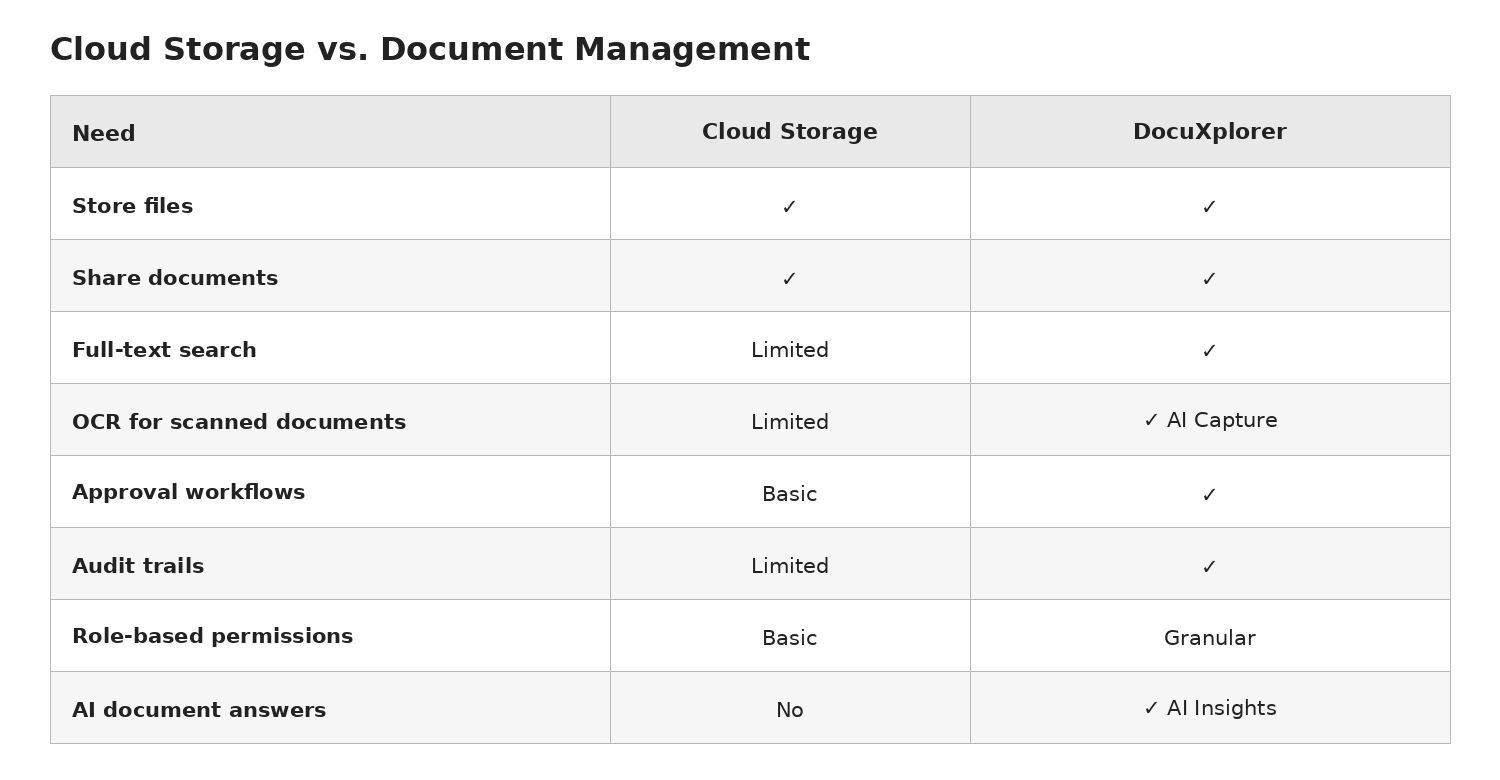
Cloud storage is designed to keep files accessible across devices and make collaboration easier. That works well when the goal is simply sharing documents.
A document management system goes further by organizing the business processes connected to those documents. Instead of relying on folder structures and manual follow-ups, teams can build consistent workflows around invoices, HR records, contracts, policies, customer files, and other business-critical documents.
That distinction becomes especially important as teams grow, work remotely, or face compliance requirements.
Business documents rarely exist in a single format. A purchase order might arrive as a PDF, supporting documentation could be in Excel, and approvals may involve Word documents or scanned forms.
DocuXplorer keeps those files in one place while integrating with Microsoft Office, allowing users to preview Word, Excel, and PDF files without needing every application installed locally. Teams can also apply digital signatures, making documents easier to approve and authenticate without leaving the system.
Instead of jumping between multiple tools, employees can manage the documents they use every day from a single workspace.
Searching for a document shouldn't depend on remembering exactly what someone named the file six months ago.
One of the biggest differences between cloud storage and document management software is metadata. DocuXplorer stores searchable information alongside each document, making it possible to locate files by customer name, invoice number, project, date, or other business-specific information.
AI-powered features have enabled a new level of efficiency in document management. With tools like AI Capture, scanned documents become searchable automatically through OCR, eliminating much of the manual filing that slows teams down.
Search has evolved beyond finding files, too. Sometimes the challenge isn't locating the document—it's finding the answer inside dozens of documents. DocuXplorer's AI Insights allows users to ask natural-language questions about their stored documents, helping them quickly locate policy details, contract language, or historical records without opening file after file.
For organizations with years of accumulated documentation, that can significantly reduce the time spent hunting for information.
As businesses handle more customer information, employee records, and financial documents, security typically needs to tighten as well. Protecting files through encryption is a core feature of document management systems—but they also let you control who can access them and provide proof of what happened when questions arise.
DocuXplorer includes role-based permissions that let administrators control access at a much more granular level than standard file sharing. Every document interaction is tracked through audit trails, making it easier to demonstrate compliance during internal reviews or regulatory audits. DocuXplorer’s authenticated workflows also help reduce unnecessary risk and streamline AP processes.
These controls become especially valuable for industries that regularly manage important and sensitive documentation, including financial services, healthcare, manufacturing, laboratories, and public utilities.
Many businesses discover that their biggest document challenge isn't storage—it's the repetitive work surrounding documents.
Invoices get stuck waiting for approvals. Employee onboarding paperwork moves through multiple departments. Contracts require reviews from several stakeholders before they're signed.
Instead of relying on email chains and manual reminders, workflow automation lets you route documents through predefined processes. DocuXplorer’s workflow automation simplifies core business processes like invoice approvals. Teams can also build workflows for HR forms, contract reviews, compliance signoffs, and other recurring processes without juggling multiple applications.
The result is greater visibility into where work stands, fewer bottlenecks, and less time spent chasing approvals.
See how workflow automation with DocuXplorer reduced manual processing in a real AP environment →
One difference businesses often overlook is what happens after implementation.
Most cloud storage providers rely primarily on self-service documentation and support channels. For organizations that depend on document systems to run daily operations, configuring permissions, workflows, and document organization often requires more specialized guidance.
DocuXplorer gives customers direct access to customer support advocates, IT, and business process consultants by phone, email, and remote support, helping teams get the most out of the platform instead of figuring everything out on their own.
Cloud storage remains a good solution for many situations. If you're a freelancer, a small team collaborating on shared documents, or simply need secure online backup, platforms like Google Drive and Dropbox can be a practical fit.
The picture changes when document volume starts to make storage itself a source of work. For example, if your organization is collecting 300 or more documents a month—including invoices, contracts, customer records, forms—it doesn't take long for folders and shared drives to become difficult to manage. Employees could spend several minutes (per document) searching for what they need, figuring out which is the latest version, or following up on approvals, instead of putting that time to work.
At that volume, cloud storage can become less of a solution and more of a filing cabinet that someone has to constantly maintain. A document management system can take over much of that organization through automated capture, metadata, search, permissions, and workflows.
Businesses often reach a tipping point where shared drives start creating more work than they save. If employees spend too much time searching for documents, approvals happen through long email chains, sensitive files require tighter access controls, or compliance preparation becomes stressful, those are signs that storage alone may no longer be enough.
Document management software helps create consistency around how documents are captured, organized, secured, and routed through the business. Instead of replacing cloud access, it adds the structure and automation that growing organizations need to keep work moving efficiently.
Whether you're managing invoices, contracts, HR records, or compliance documentation, the goal isn't simply storing files—it's making sure your documents actively support how your business operates.
Ready to see what that looks like? Explore how DocuXplorer helps businesses organize documents, automate workflows, and find information faster with AI-powered search.